Why memory matters more than it seems
In a laptop, memory is about more than how many gigabytes it includes. Capacity determines how much data can remain available without turning to storage; speed and bus design affect the throughput that the processor, integrated graphics and other accelerators can share. In a unified-memory architecture, different parts of the chip access the same pool, so capacity and bandwidth can matter especially for graphics, multimedia and inference. Apple announced configurations of up to 128 GB for the MacBook Pro with M3 Max and describes its approach as unified memory. [evidence: ev_a0fc234c53596f6fc015]
That does not mean that more speed or more memory will always produce a noticeable improvement. The result depends on the task, memory controller, channel configuration, cooling and software. An iGPU sharing memory with the CPU may be more sensitive to bandwidth than everyday office work; an application that exceeds available capacity may be affected by swapping data with the SSD. These are separate factors: capacity helps keep working sets resident, while bandwidth describes potential transfer speed. Neither alone predicts overall performance.
Glossary: DDR5, LPDDR5X, LPDDR6, channels and MT/s
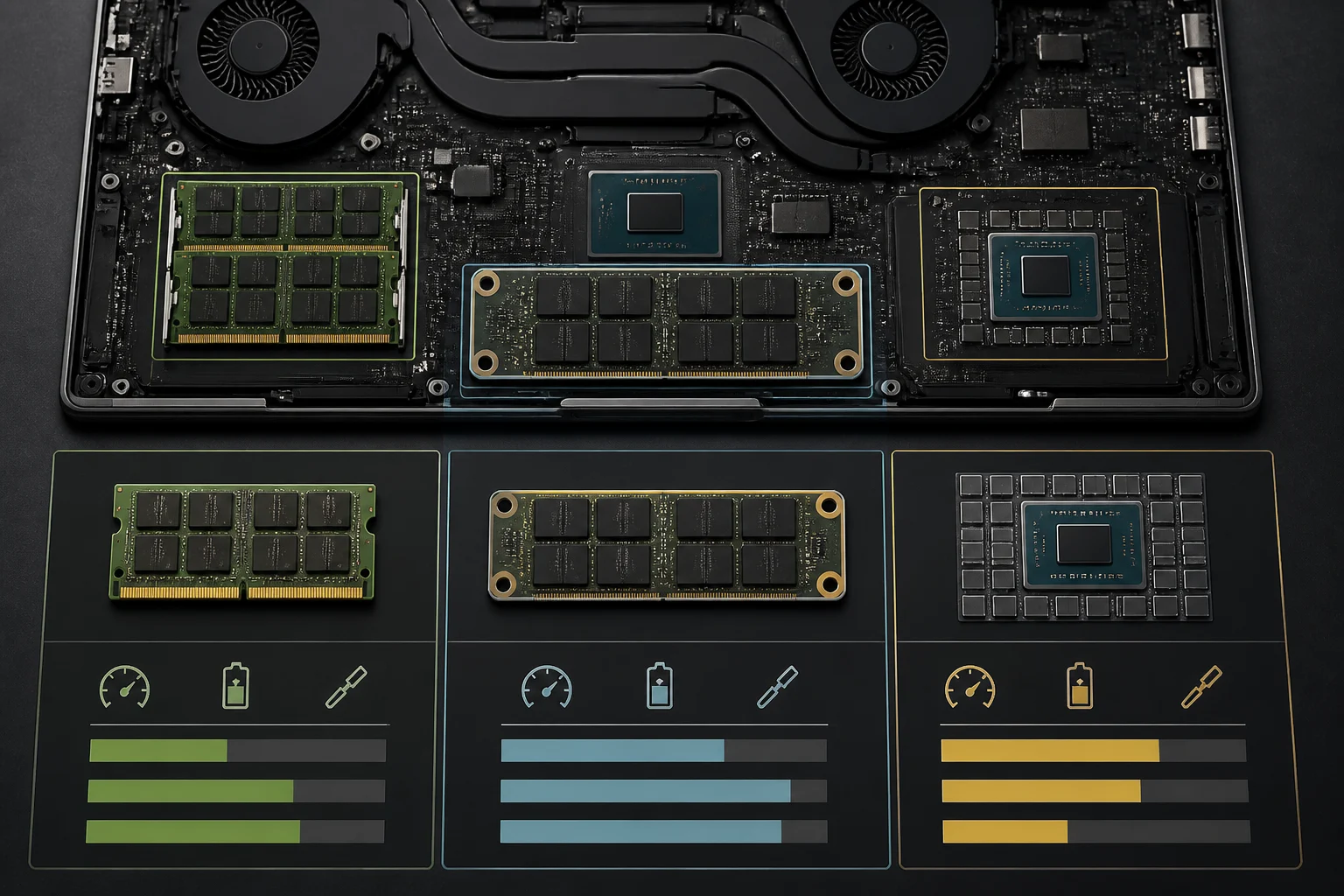
DDR5 SO-DIMM is a module format used in some laptops, but do not assume every DDR5 laptop can be upgraded: the memory may also be soldered. Speeds are usually expressed in MT/s, or transfers per second, rather than MHz. When reading a specification sheet, distinguish the transfer rate from clock frequency and check the speed supported by the complete laptop. Also verify how many slots it has and what capacity the system supports: the processor specification does not always describe the limits of the finished laptop.
LPDDR is a low-power memory family common in mobile devices and thin laptops. It can be soldered or used in a module such as LPCAMM2; whether it can be replaced depends on the specific design, not just the technology name. LPDDR6 appears in the draft as a next-generation technology, but the verified sources available for this revision do not establish its specification, speeds or presence in commercial laptops. We therefore do not assign figures or availability to this memory: the existence of a generation or standard, by itself, does not show that a particular laptop includes it.
Four approaches to laptop memory
Soldered LPDDR usually means users cannot upgrade memory after purchase. Qualcomm specifies LPDDR5X memory and 135 GB/s of bandwidth for Snapdragon X Elite. [evidence: ev_2d47bf2ae4ab606e143f] That figure describes the processor platform; it should not be confused with a performance measurement for a particular laptop. If the memory cannot be replaced, the practical decision is to choose a capacity that covers expected needs over the computer’s useful life.
DDR5 SO-DIMM can be replaceable in laptops with accessible slots, a potential advantage for upgrades or replacement. By itself, it does not guarantee that every module or capacity will work: firmware, the controller, slot count and motherboard specifications impose limits. Before buying, check the documentation for the exact model and the configuration supported by the manufacturer.
CAMM2 is a memory-module format. Available coverage reports its commercial availability for industrial computers, but does not establish which laptops include it or whether the module is user-accessible. [evidence: ev_15734f48401e7b0ccbb9] Keep three questions separate: what type of memory the module supports, whether the computer’s design allows it to be replaced, and who is authorized to perform the service.
On-package memory: what it means for buyers
On-package describes where components are located within the same package, but it is not a universal synonym for a particular mounting method, nor is it enough to conclude how much battery life or temperature will improve. The cited Intel support page covers how to locate memory information for mobile processors; it does not, by itself, support a specific Lunar Lake configuration or its figures. For capacity and speed, consult the specification sheet for the specific processor or laptop. [evidence: ev_26e6b70c8b15117b71a7]
Memory integrated into the package may reduce the physical distance between components; without comparable measurements, that does not justify claiming that a computer will sustain higher frequencies or produce less noise. Sustained performance also depends on the laptop’s power limits and thermal system. The useful takeaway for buyers is simpler: if the manufacturer offers no later upgrade, installed capacity is a purchasing decision and should be compared with real needs, not a generic promise of efficiency.
How to read platform specifications
Do not attribute one memory configuration to an entire processor family when the manufacturer decides the final computer’s configuration. Intel says to consult the processor specification sheet to identify compatible memory types. [evidence: ev_26e6b70c8b15117b71a7] Even so, processor compatibility is not the same as the laptop’s configuration: the manufacturer may choose soldered memory, modules, different capacities or design-specific limits.
To find out what memory a particular model has, use its specification sheet. Lenovo publishes specifications for the ThinkPad E14 Gen 7 Intel in its PSREF; that documentation applies to that model, not to an entire platform. [evidence: ev_d0efe715e0eec03f3999] Check the exact laptop’s specification sheet, not just the processor-family name, and look for installed capacity, memory type and upgrade options.
It is also worth distinguishing a commercial name from the actual memory generation and configuration. “DDR5” alone does not tell you capacity, effective speed, channels or whether it can be replaced; “LPDDR5X” does not prove that a computer is necessarily irreparable, because modular formats exist. The laptop’s documentation should resolve these details. If it does not specify whether memory is soldered, how many slots there are or the maximum capacity, treat that as unanswered and ask the seller or manufacturer before paying.
Bandwidth, latency and workloads
Bandwidth and latency are related but different properties. Bandwidth expresses how much data can be transferred per unit of time under specified conditions; latency is how long an operation takes to respond. Transfer speed per pin is not enough to compare two complete systems: bus width, channel count, memory organization and the controller also matter. Comparing only two transfer-rate figures can therefore mislead if the rest of the configuration is unknown.
For integrated-graphics tasks, system memory may be shared with the CPU and become a constraint during heavy graphics activity. For other workloads, how much data fits in memory may matter more than peak throughput. You cannot infer a particular result in gaming, editing or AI from a speed figure without tests of the computer and application. As a buying rule, compare complete laptops with known configurations and power limits; do not assume faster memory guarantees a proportional improvement.
Capacity, battery life and repairability: practical decisions
Before choosing capacity, think about how many applications you use at once, project sizes and whether you will run local models or libraries. Avoid turning figures such as 16, 32, 64 or 96 GB into universal recommendations: needs vary by type of work, and the maximum supported varies by model. On computers with non-upgradeable memory, too little capacity may force you to close applications or rely more on storage; with modules, an upgrade may be possible, but it should be expressly supported by the specification sheet.
Memory efficiency does not directly equal laptop battery life. The display, processor, radio, battery, workloads and system settings also play a part. Similarly, a replaceable module does not by itself determine overall repairability or warranty terms: physical access, manufacturer instructions and service availability in the relevant market matter. The useful distinction is between soldered memory, memory in a replaceable module, and memory the manufacturer allows to be replaced only through a service technician.
To decide, check the included capacity, whether it can be upgraded, the supported memory type and speed, slot count and the maximum capacity listed for the exact laptop. Also ask whether memory is soldered and whether accessing the module affects the warranty. Without an official answer, do not assume that a platform supports a particular capacity or that users can repair a configuration themselves. Architecture offers clues, but the model’s specification sheet and local service terms should settle the purchase.