NAS and SAN solve related problems, but they are not equivalent
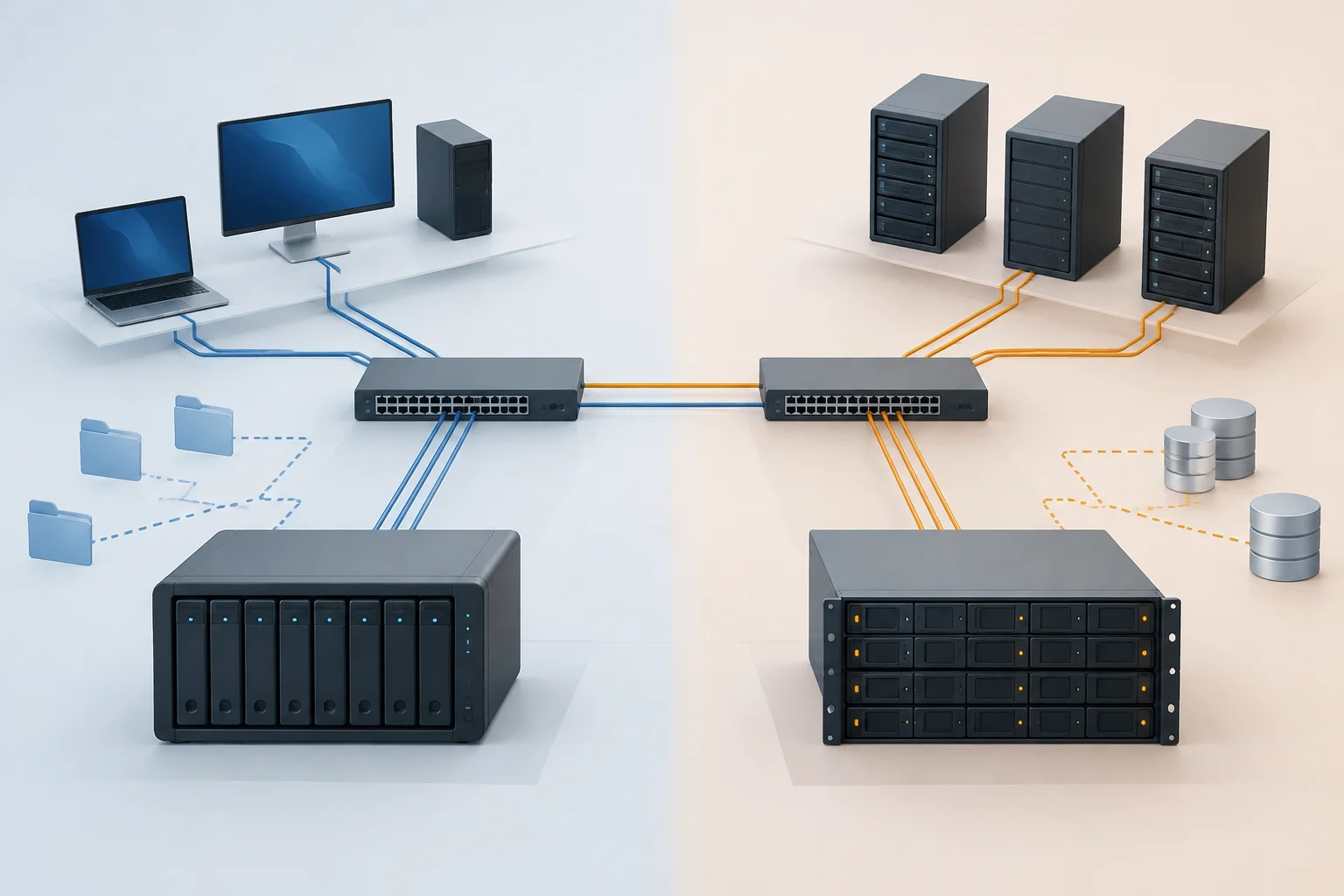
NAS (Network Attached Storage) and SAN (Storage Area Network) describe different ways of providing storage through a network infrastructure. In general, a NAS serves files and directories to clients; a SAN provides block storage that a server can use as a storage device. The difference is not simply the size of the equipment or the number of disks: what matters is which resource the client system sees and who manages the file system.
With NAS, the storage device or server usually manages the file system and publishes shared resources for users or applications. With SAN, the connected server receives volumes or logical units and usually manages its own file system on them. For that reason, calling any server with shared disks “NAS,” or any fast storage “SAN,” can obscure important decisions about access, administration, and compatibility.
Both architectures can be used in an organization and can coexist. An organization might share team folders through NAS and reserve a SAN for servers that need block volumes. There is no universal winner: if the problem is making documents easy to access, the priorities are not the same as when an application needs to manage a block volume.
Files versus blocks: the difference that shapes applications
With file access, the client requests actions on items identified as files and directories: opening, reading, writing, or changing attributes. Users can browse shared folders, and applications work with paths and permissions provided by the service. Protocols such as SMB and NFS support this model. Clients see a shared file structure, although implementation and available options depend on the server and protocol.
With block access, storage presents a logical unit to the server as a device that it can partition or format. The protocol transmits operations on blocks, not a folder ready to browse. The server operating system manages the file system, while the underlying storage provides the blocks. iSCSI is a standardized way to transport SCSI storage commands over IP networks; its specification describes the protocol but does not, by itself, guarantee performance, availability, or ease of deployment.
The distinction has operational consequences. In the file model, managing permissions, shared paths, and access by multiple clients is central to the service. In the block model, you must define who presents and consumes each volume and how to prevent multiple servers from writing to a file system that is not designed for concurrent access. Do not assume that a shared block volume can be safely mounted on multiple servers: that depends on the file system, cluster, and supported configuration.
SMB, NFS, and iSCSI: compare the protocol with real-world use
SMB is a family of protocols for sharing files over a network, widely associated with Windows environments, although its use is not limited to a single operating system. Microsoft documentation describes protocol features and its implementation in Windows and Windows Server. When evaluating a NAS, check which SMB versions the device offers, which authentication and permission options it supports, and whether the functions your organization needs are compatible with its clients. The protocol name alone does not answer those questions.
NFS also provides access to files and directories over a network. Its Windows Server documentation explains NFS support in that system; the actual options depend on the server and client versions and implementations. If Unix or Linux systems coexist with other platforms, verify interoperability in practice: supported versions, identity mapping, permissions, file locking, and export configuration. NFS does not automatically turn a device into a SAN: it remains a file-access protocol.
iSCSI is used to present block storage over IP networks. RFC 7143 defines the iSCSI protocol, while RFC 7146 addresses security requirements for IP-based block storage protocols using IPsec. These are technical references for understanding the scope of each technology, but they do not replace vendor documentation, network design, or security policies. Before choosing iSCSI, confirm that the planned initiators, targets, operating systems, and administration tools are compatible.
Network, administration, and security: costs not reflected in capacity
The advertised capacity figure is not enough to compare deployments. Size the network for the expected workloads and review congestion, redundancy, latency, alternate paths, and potential single points of failure. A SAN can use iSCSI over Ethernet, so do not assume that every SAN requires a separate physical network. Even so, separating or segmenting storage traffic may be an appropriate design choice; evaluate its operational impact, isolation, and availability in the specific environment.
Administrative effort is also part of the cost. With NAS, the responsible team may manage shared resources, users, quotas, permissions, backups, and service updates. With SAN, in addition to managing volumes, it may need to coordinate their presentation to servers, connectivity, multipathing, and file-system administration on hosts. These are common design responsibilities, not an identical checklist for every product: included features and required work vary by solution.
Security must be reviewed end to end. Identify how clients authenticate, how access is authorized, which traffic can reach storage services, and how communications are protected for the architecture and product in question. For iSCSI, RFC 7146 provides context on protecting IP-based block protocols; it does not establish that a particular installation is secure. Also document change control, failover, and recovery testing. Redundancy does not replace backups: it protects against certain failures, but not necessarily against deletion, operational mistakes, or incidents affecting replicated data.
Cost and scale: calculate the complete solution, not a label
It is not rigorous to claim that NAS always costs less or that SAN always scales better without specifying capacity, performance, availability, support, and expected service life. An economic comparison should include storage, required network equipment and adapters, licenses, warranties, power consumption, space, support, and administration hours. A simple NAS may reduce initial work for shared folders; a block-storage requirement integrated with servers may justify a SAN. These are evaluation hypotheses, not conclusions that apply to every vendor.
Ask each option to support the same workload and service level. Define usable capacity, expected growth, number of clients, relevant read and write patterns, and required recovery time. Then check whether the product documentation supports those characteristics and which components are outside the offering. Do not compare raw capacity with usable capacity, or a commercial maximum with a performance guarantee for your workload.
It is also useful to distinguish capacity from ease of expansion. Check documented limits for drives, volumes, clients, protocols, and expansion, as well as support conditions and migration paths. General storage guides help explain categories but do not substantiate the performance of a specific device. Without a defined model, configuration, and usage conditions, there is no basis for publishing a price or performance comparison between solutions.
A practical decision based on the scenario
As a first filter, identify what the applications need to consume: shared folders, or block volumes managed by servers. Then validate protocols and operating systems, and finally assign an owner for operations, security, and recovery tasks. This order helps avoid choosing based on an isolated speed figure or the name of an architecture.
| Main need | Starting point | Key checks |
|---|---|---|
| Share documents and folders among users | NAS with SMB or NFS, depending on clients | Permissions, identity, protocol versions, and backups |
| Provide volumes to servers or applications that consume blocks | SAN or block service, depending on compatibility | Initiators, targets, file system, concurrency, and redundant paths |
| Combine user folders and server storage | Evaluate NAS and SAN for different functions | Workload separation, administration, and total cost |
| Choose among offers before the workload is known | Defer the final choice | Measure requirements, validate limits, and request comparable documentation |
The table is a starting point, not certification that a technology suits a particular case. Some commercial solutions combine file and block services; that combination does not erase the differences between access models or prove that every protocol is available in every configuration. Verify specific capabilities in the documentation for the model to be deployed and the relevant software versions.
What to check before approving a purchase
Before deciding, gather a description of applications, clients, data, and recovery objectives. If the organization cannot yet specify latency, availability, growth, or concurrency requirements, record those gaps and do not present a preliminary choice as final. There is also no need to begin with a brand: establish the access pattern first, then evaluate products that can support it.
A short validation list helps turn the comparison into a verifiable decision:
- Does the application require file access or block access?
- Which versions of SMB, NFS, or iSCSI does each endpoint support?
- How are identities and permissions mapped, and who manages volumes and shared resources?
- What network design, redundancy, and isolation does the solution require?
- How are backups made, restoration verified, and outages managed?
- Which purchase, support, operating, and expansion costs are included in the calculation?
The most useful answer is usually an architecture tailored to demonstrable requirements, not a more prestigious label. For file sharing, start by evaluating NAS and its protocols; when the server needs to manage blocks, examine SAN or equivalent services and their coordination requirements. If both needs exist, consider meeting them separately. Decide on the basis of documented requirements, compatibility, and responsibilities, and state clearly what has not yet been measured or confirmed.