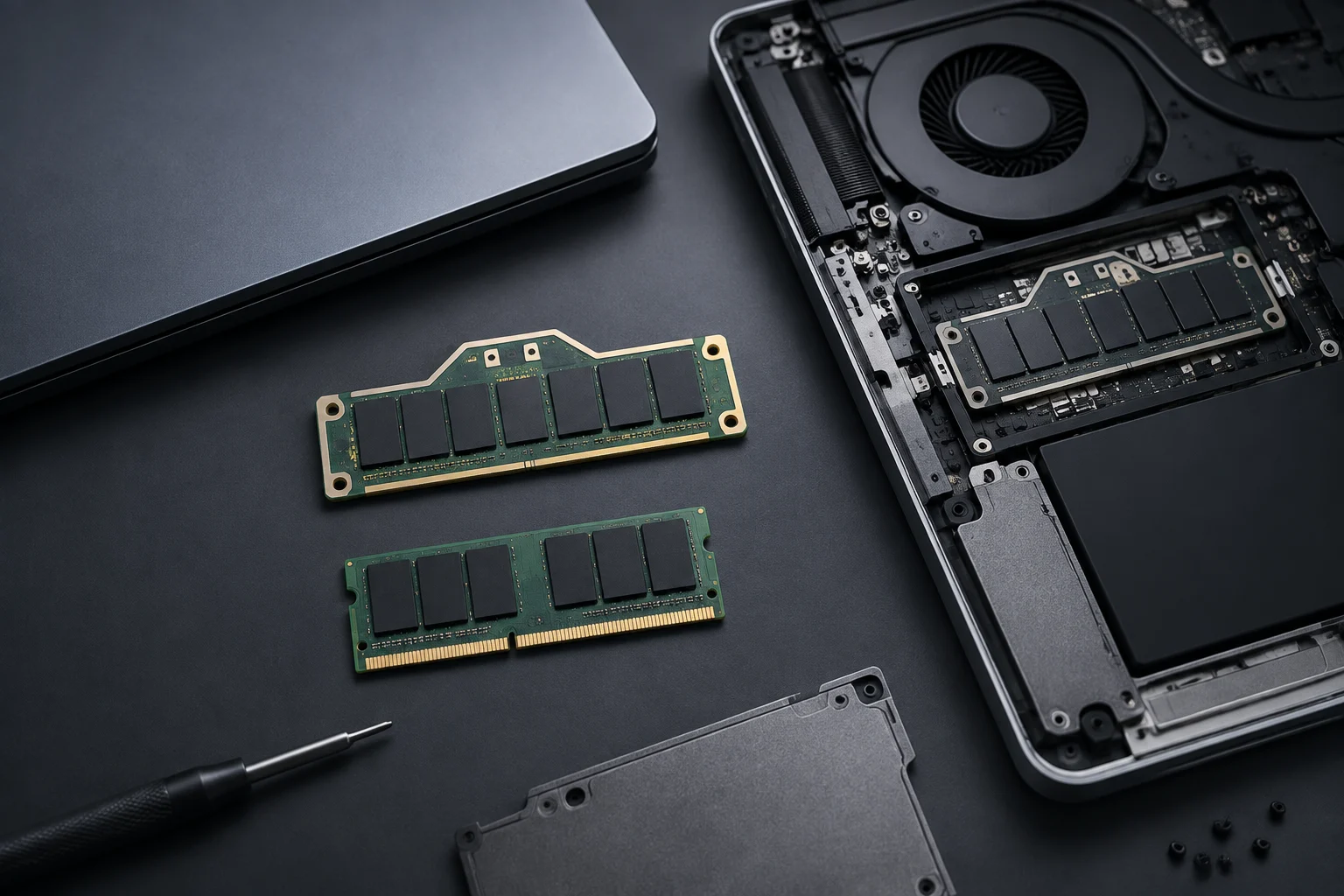
Executive summary: why CAMM2 matters in 2026
CAMM2 is the compressed memory module standard for laptops approved by JEDEC in November 2023. Unlike SO‑DIMM, it integrates the 128‑bit dual‑channel bus on a single board, improves signal integrity and reduces z‑height, enabling thinner chassis and higher memory frequencies without always resorting to soldered RAM. For anyone buying or refreshing fleets in 2026, this translates into better performance options and, in many models, replaceable RAM again without compromising industrial design. From an asset management angle, it also adds predictability: a single, documented form factor that reduces proprietary variants and simplifies medium‑term support.
In this cycle we already see both commercial and consumer systems with CAMM2, alongside the first industrial and branded memory modules available to purchase. LPDDR in LPCAMM2 form is shipping with advertised speeds up to 8,533 MT/s and energy savings versus equivalent solutions, while DDR5 CAMM2 is positioned to gradually replace SO‑DIMM wherever height and routing constraints demand it. The practical outcome is higher sustained bandwidths, better efficiency, and a clear path for planned upgrades over 3–5 years. For IT scenarios, this helps square TCO and staggered refresh cycles without compromising form factor or battery life.
All of this comes with clearer documentation than ad‑hoc proprietary modules. Vendors are publishing service manuals with explicit CAMM2/LPCAMM2 procedures, torque orders and capacity limits, which sharply reduces guesswork during upgrades. If you standardize on models that publicly document their CAMM2 implementation, you can pre‑validate parts, reduce spare complexity, and keep downtime short during field interventions. That is why CAMM2 is not merely a new connector: it is a standard that meaningfully changes the maintainability equation for thin‑and‑light and mobile workstations in 2026.
What CAMM2 is and what it solves versus SO‑DIMM
CAMM2 defines shared electrical and mechanical requirements for two module types: DDR5 CAMM2 and LPDDR5/5X CAMM2 (LPCAMM2). By consolidating the dual channel into a single, flat, screw‑down board, it reduces vertical space and simplifies motherboard routing under the lid, both critical in ultralights and slim mobile workstations. Compared with SO‑DIMM, the benefits include lower connector inductance, shorter and better‑controlled traces, and fewer stacking constraints, which make it easier to run high memory speeds with improved stability. The compression‑mount approach itself enhances contact quality and reduces vibration effects—factors that can make a real difference at high frequencies in thin chassis.
Beyond mechanics, CAMM2 brings a support ecosystem around SPD and power (PMIC) tailored to DDR5 and LPDDR5/5X, ensuring consistent identification, telemetry, and power management. For buyers, the translation is straightforward: flatter modules, potential for higher frequencies, and compatibility that is documented by manufacturers in manuals and spec sheets, rather than relying on proprietary daughtercards or non‑replaceable soldered RAM. In practice, this reduces the risk of part mismatches and facilitates configuration audits, because the module reports its profile and limits in a standardized way.
Another problem CAMM2 tackles is thermal and airflow contention created by stacked SO‑DIMMs in tight spaces. By moving to a single 128‑bit module with a low profile and a defined top cover acting as a light heatsink/compressor, OEMs can sustain intended memory speeds more consistently while preserving room for battery, speakers, or additional I/O. That balance—performance without thickness penalties—is at the heart of why CAMM2 has been adopted by vendors that previously soldered LPDDR for thinness alone.
Two families: DDR5 CAMM2 vs LPDDR/LPCAMM2
- DDR5 CAMM2: uses standard DDR5 chips and targets laptops that would previously have used SO‑DIMM. It preserves user or service replaceability, with effective 128‑bit modules (two 64‑bit sub‑channels) on a single card. It is the typical choice in mobile workstations, rugged systems, and chassis where thickness is constrained but replaceable RAM is still required. The dual‑channel semantics remain, just integrated onto a lower‑profile board with cleaner routing, which favors stability at target frequencies without the mechanical compromises of two SO‑DIMMs.
- LPDDR/LPCAMM2: employs LPDDR5/5X in a replaceable module. It retains the efficiency and high frequency characteristics of low‑power RAM that used to be soldered, but now in a swappable format. This brings the bandwidth profile of LPDDR ultrabooks to systems that, by IT policy, need replaceability. In 2026, several manufacturers have announced or are shipping LPCAMM2 laptops, and modules from suppliers like Micron and Innodisk target speeds between 7,467 and 8,533 MT/s, prioritizing lightness and battery life. For those seeking a balance between sustained performance and long runtimes, LPCAMM2 offers precisely that, without giving up the option to increase capacity in the future once the OEM validates it.
Choosing between the two is not only a performance matter but a platform one. If your workflows emphasize maximum capacity and broad third‑party module availability in service channels, DDR5 CAMM2 aligns more closely with traditional upgrade paths. If your priority is efficiency and integrated‑graphics performance per watt in a thin chassis, LPCAMM2 aligns with how leading ultralights achieve high bandwidth without the heat and routing penalties of discrete DIMMs. Either way, the intent is the same: standardize the physical and logical layer so upgrades and diagnostics become repeatable and well‑documented.
Performance and efficiency: bandwidths, latencies and power
In LPCAMM2, product communications cite speeds up to 8,533 MT/s and active power reductions versus DDR5 configurations delivering similar performance, thanks to lower voltage and the module’s topology. In DDR5 CAMM2, industrial vendors position 6,400 MT/s as a broadly deployable target, with a 128‑bit bus on a single module that is effectively equivalent to two SO‑DIMMs in parallel—but with better routing and lower height. This translates into higher sustained bandwidth and, on platforms with integrated GPUs, potential gains in graphics performance due to improved memory feed. It also benefits memory‑intensive tasks such as video editing, light data science, or VMs on iGPU systems, where the bottleneck is often bandwidth rather than raw latency.
On specific platforms, the real ceiling is determined by the processor’s memory controller and the laptop maker’s validation. For example, Intel’s Core Ultra families (Meteor/Series 1 and 3) document support up to LPDDR5X‑7,467 MT/s (with variations by SKU), and AMD’s Ryzen AI 300 publishes support up to LPDDR5X‑8000. In practice, an 8,533 MT/s LPCAMM2 module may be capped at 7,467/8,400 MT/s if the CPU/board does not enable higher rates; hence the importance of reading the system spec and service manual closely before buying a module. It is equally useful to check BIOS notes related to memory training and sleep states, since a firmware update can improve compatibility and stability without changing hardware.
Bandwidth wins do not erase latency realities. LPDDR generally has different timing characteristics than desktop‑style DDR5, and absolute latency may not drop in step with frequency. Even so, many mobile workloads respond better to sustained throughput and efficiency, particularly those leaning on iGPU or unified memory approaches. Matching module speed to the validated IMC ceiling, and keeping firmware current, yields the most reliable outcome without chasing paper specs the platform will never reach in practice.
Compatibility and limits: sockets, capacities and BIOS
Although DDR5 and LPDDR5/5X share the physical CAMM2 connector, they are not interchangeable: a system designed for LPCAMM2 will not accept DDR5 CAMM2 and vice versa. In addition, OEMs set capacity limits by design and firmware. There are laptops with a single LPCAMM2 slot validated up to 64 GB or 96 GB depending on platform and board, and workstations with DDR5 CAMM2 that define their own ceilings. SPD and power (PMIC) compatibility are standardized, but each BIOS implements its own memory training routines and tested module matrices. Therefore, before planning an upgrade, confirm the model’s maximum capacities and approved combinations in official documentation, paying attention to the required BIOS version.
There is also a practical mounting angle. On ThinkPads with LPCAMM2, the assembly includes a screw‑down “top cover” that doubles as heatsink/compressor. If the three screws are not tightened to the specified torque, boot failures can appear after replacement; Lenovo’s manuals explicitly call this out under troubleshooting. On Dell systems, service manuals likewise detail the procedure and screw order for removing/installing LPCAMM2. Keeping UEFI/BIOS current is essential, as some vendors release ongoing fixes for memory training and compatibility during the product lifecycle. Best practices include performing the swap with the battery disconnected, observing ESD precautions, and following the recommended screw sequence to ensure even pressure on the module.
Finally, plan for part identification. Because SPD is standardized, inventory systems can read module identity and profiles for audits and lifecycle tracking. Verify part numbers and validated lots for your platform before bulk purchasing, particularly where regional availability differs between retail and B2B channels. This forethought reduces RMA churn and makes field support more predictable when expanding capacity mid‑cycle.
Real‑world use cases: when you can upgrade and when you can’t
- Laptops with DDR5 CAMM2: aimed at mobile workstations and industrial systems where capacity upgrades (e.g., from 32 to 64/128 GB when available) are an expected part of the lifecycle. Here, moving from SO‑DIMM typically brings fewer thermal restrictions and more stability at 6,400 MT/s. It is a natural fit for workflows that prioritize abundant memory with mobile CPUs/HPC, and for environments where quick, repeatable service access is a contractual requirement.
- Ultralights with LPCAMM2: offer the benefits of LPDDR (efficiency and speed) now in a replaceable form. They suit IT plans that want to refresh RAM in year 2–3 without swapping the motherboard. However, many chassis include only one LPCAMM2 bay and depend on CPU/platform limits (e.g., 64 or 96 GB). If you require two modules or ECC profiles, study the datasheet carefully: ECC in consumer LPCAMM2 is not common in 2026. For mobile creative profiles and advanced office with local AI, this path adds RAM headroom while keeping a thin form factor, provided you respect the OEM’s compatibility matrix.
In both scenarios, the success of an upgrade hinges on documentation and validation. Follow the service manual, check BIOS requirements, and test with a known‑good module before scaling to a fleet. Where possible, pilot the process on one unit to lock down torque steps, boot checks, and imaging scripts that rely on specific memory sizes. The more rigor you bring to preparation, the more CAMM2 delivers on its promise of thin, fast, and maintainable systems.
Availability in 2026: suppliers and verifiable CAMM2 laptops
- Module suppliers: Micron/Crucial is selling LPCAMM2 with advertised speeds of 7,500–8,533 MT/s; in the industrial space, Innodisk offers DDR5 CAMM2 (up to 6,400 MT/s) and LPCAMM2 (target 8,533 MT/s), and ADATA Industrial lists LPCAMM2 variants for integrators. Logistically, early availability may vary by region and channel (retail vs B2B), so verify part numbers and validated lots for your platform before volume orders.
- Laptops with public CAMM2/LPCAMM2 documentation: Lenovo ThinkPad P1 Gen 7 (2024) with an official replacement guide for the module and top cover; Dell Pro/Precision 5 (14” and 16”, 2026) with specific LPCAMM2 installation sections in service manuals; and Framework Laptop 13 Pro (Intel Core Ultra Series 3) with a single LPCAMM2 slot documented in its knowledge base. These references let you confirm screw patterns, assembly order, capacity limits, and boot notes before purchase. Always prioritize systems with explicit documentation: it shortens intervention time and avoids compatibility surprises.
- Watch support advisories: Lenovo publishes a specific note for ThinkPad P1 Gen 7 warning of potential no‑boots after installing CAMM2 if the top cover is not properly tightened. These support articles signal ecosystem maturity: they do not invalidate the standard, but they do remind us that mounting and validation matter. For fleet purchases, include a step to update BIOS and verify boot after the module change to standardize the procedure and minimize incidents.