Exposure mechanisms: the technical foundation
The mechanical shutter uses physical curtains that move in front of the sensor to control exposure. At shutter speeds equal to or slower than the flash sync speed, one curtain can uncover the sensor and, after the exposure time, the other covers it. At faster speeds, both curtains move to form a slit that travels across the sensor. By contrast, the electronic shutter controls exposure electronically without moving physical curtains. This difference is not merely about how each system works: it determines how it responds to motion, lighting, and flash use.
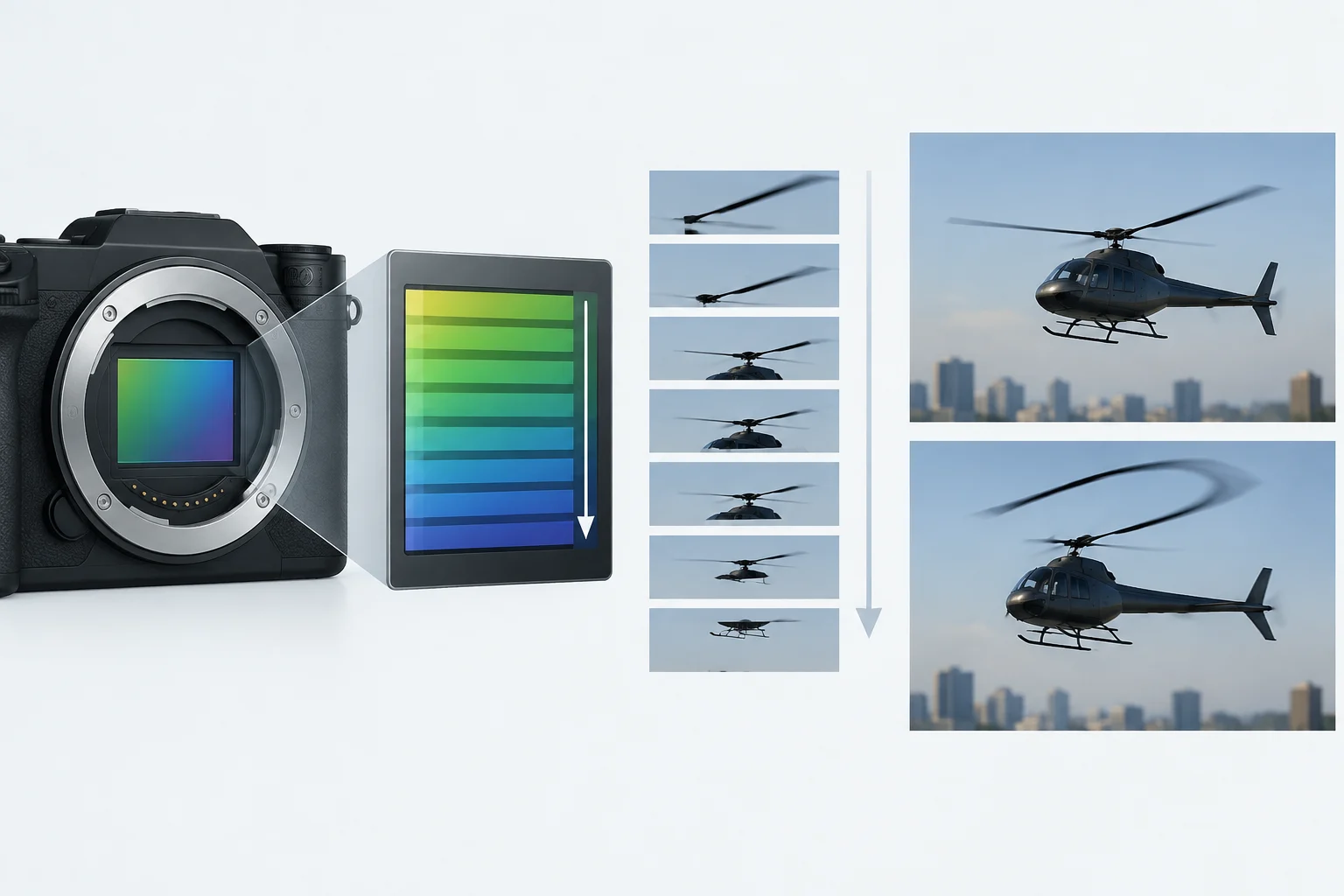
On some sensors, exposure with an electronic shutter uses rolling or global readout. With rolling readout, pixel lines begin exposing one after another, with a temporal offset between them; the exposure time is the same for all lines. Each part of the image therefore corresponds to a slightly different moment in time. In its technical comparison, Basler notes that rolling shutter usually produces less ambient noise than global shutter. Specific characteristics depend on the sensor and model.
That is why shutter type affects how a scene is represented even when the selected exposure time is the same. Sensor readout speed matters especially when something is moving: the longer the interval between the start and end of readout, the greater the chance that motion will alter the recorded shape.
Banding under artificial light
One issue that can arise when using the electronic shutter is horizontal banding, also called banding. It may appear when photographing under fluorescent or LED lamps and other sources of flickering or unstable light. The result depends on how changes in the light coincide with the sensor readout.
If the illumination changes while the sensor records its different lines, some areas may be exposed at a different intensity from others. A problem that is not always obvious to the naked eye in the scene can therefore appear clearly in the photograph.
Some cameras offer a flicker reduction function to reduce its effects in photographs. Its operation and availability depend on the model and selected mode; consult the camera manual to learn which options are available.
Under artificial light, check which shutter types and flicker-reduction settings your camera allows you to combine. Not all options are compatible. Take a test shot with the session settings and look for banding; changing modes may help, but does not guarantee a solution for every light source. Consult your model’s manual before assuming an automatic option behaves like another mode.
Motion distortion and readout speed
Rolling shutter distortion appears because the sensor lines begin exposing at different times. If an object moves quickly during readout, its position changes while the camera records different parts of the image. The result may include leaning buildings or twisted propellers, even though their actual shapes are straight or regular.
In a static scene, this delay usually goes unnoticed because the elements do not change position during capture. In sports or wildlife photography, the effect can be more visible if the subject moves while the sensor is being read. Its magnitude depends on sensor readout speed, camera model, and capture conditions. Camera movement can also matter: what is relevant is displacement during the interval in which the sensor reads its lines.
With a global shutter, all pixels start and end exposure at the same time. Data is then read out row by row. Basler considers this design suitable for capturing fast-moving objects and notes more ambient noise than with a rolling shutter in its technical comparison. This description of exposure timing does not guarantee freedom from blur or every other image defect.
The characteristics of global and rolling shutters vary by sensor and camera model. When choosing between them, consider motion fidelity, noise, and intended use, and consult the equipment specifications.
Operational limitations of the electronic shutter
Using the electronic shutter may involve limitations related to the sensor and camera model. For example, the Fujifilm X-Pro3 disables flash when this shutter is used; other cameras may have different limitations. Consult the manufacturer’s manual to check which functions are available.
Flash compatibility depends on the camera and selected mode. On the Fujifilm X-Pro3, flash is unavailable with the electronic shutter. If you need flash, review the options specified for your model and select a compatible mode.
ISO sensitivity values and the effect of long-exposure noise reduction can also vary. The Fujifilm X-Pro3 manual states that, with the electronic shutter, “extended” sensitivity values are not supported, long-exposure noise reduction has no effect, and flash cannot be used. Options depend on each model.
Before a session, check the camera menu and manual to find out which functions remain available with the selected shutter. This lets you confirm compatibility with the settings you need.
Hybrid modes and electronic front curtain
The Fujifilm X-Pro3 offers several shutter-type options. According to its manual, electronic front curtain switches between the mechanical shutter and electronic front curtain; mechanical + electronic switches between the mechanical and electronic shutters; and electronic front curtain + electronic and electronic front curtain + mechanical + electronic select among all three types depending on shooting conditions.
When choosing a mode, distinguish between the shutter type that starts exposure and the combinations the camera can select automatically. Read the description of the specific option, not only its abbreviated name: a combined setting does not mean every photograph uses the same shutter type. When comparing results, note the selected mode along with shutter speed and lighting.
On the Fujifilm X-Pro3, electronic front curtain has limitations: according to the manual, faster shutter speeds increase the likelihood of uneven exposure and loss of resolution in out-of-focus areas. Keep these limitations in mind when photographing with apertures that create areas outside the focus plane.
Consequently, the Fujifilm X-Pro3’s automatic modes are not necessarily the best option for every situation. Their suitability depends on the required shutter speed and on how important exposure uniformity and detail in out-of-focus areas are. Consult the manual to choose among the available modes and account for these nuances.
Decision criteria for photographers
The shutter choice can be organized around three factors: type of lighting, subject movement, and the need for silence. Rolling shutter can distort an image if the subject or camera moves rapidly during capture. The mechanical shutter and electronic front curtain also have their own characteristics; consult the manual to learn which modes your camera offers.
When working under artificial light, consider whether the source flickers and whether the camera offers flicker reduction in the selected mode. The electronic shutter can produce bands under fluorescent lighting and other flickering or unstable sources. A test shot can help detect the problem, although the result may change with exposure and settings.
The electronic shutter is especially useful for static scenes where maximum silence is desirable. Even so, its suitability depends on the absence of movement that could be distorted, on the light being compatible with sensor readout, and on whether the model’s restrictions allow the required settings.
Before taking photographs, consult the manual to learn the specific limits on sensitivity, shutter speed, and flash compatibility. No mode is always superior: the scene determines the choice. Considering light, motion, and silence helps you evaluate the characteristics of each system.