What is an e-reader and how it differs from a digital book
An e-reader—also called an e-book reader—is a portable device whose primary use is reading digital publications: books, magazines, or documents. The term does not designate the book itself: an e-book is the digital content, while the reader is the apparatus that displays it. A smartphone or tablet can also open books, but they are general-purpose devices, not necessarily dedicated readers.
The practical difference is not just that one device allows more tasks than another. A dedicated reader usually prioritizes a reflective screen, manageable weight, reading controls, and low power consumption when keeping text on screen. A tablet typically uses an LCD or OLED screen, displays color, and responds better to video, navigation, and general applications. There are exceptions and hybrid models: the category describes the main function, not a universal list of features.
Therefore, it is useful to separate three questions when choosing: what type of texts you will read, how long you will read continuously, and whether you need other functions in the same device. Reading novels or extensive prose usually fits a dedicated reader; consulting color graphics, taking notes quickly, or switching between documents and apps may tilt the decision toward a tablet. No category guarantees comfort for all people on its own.
How e-ink works
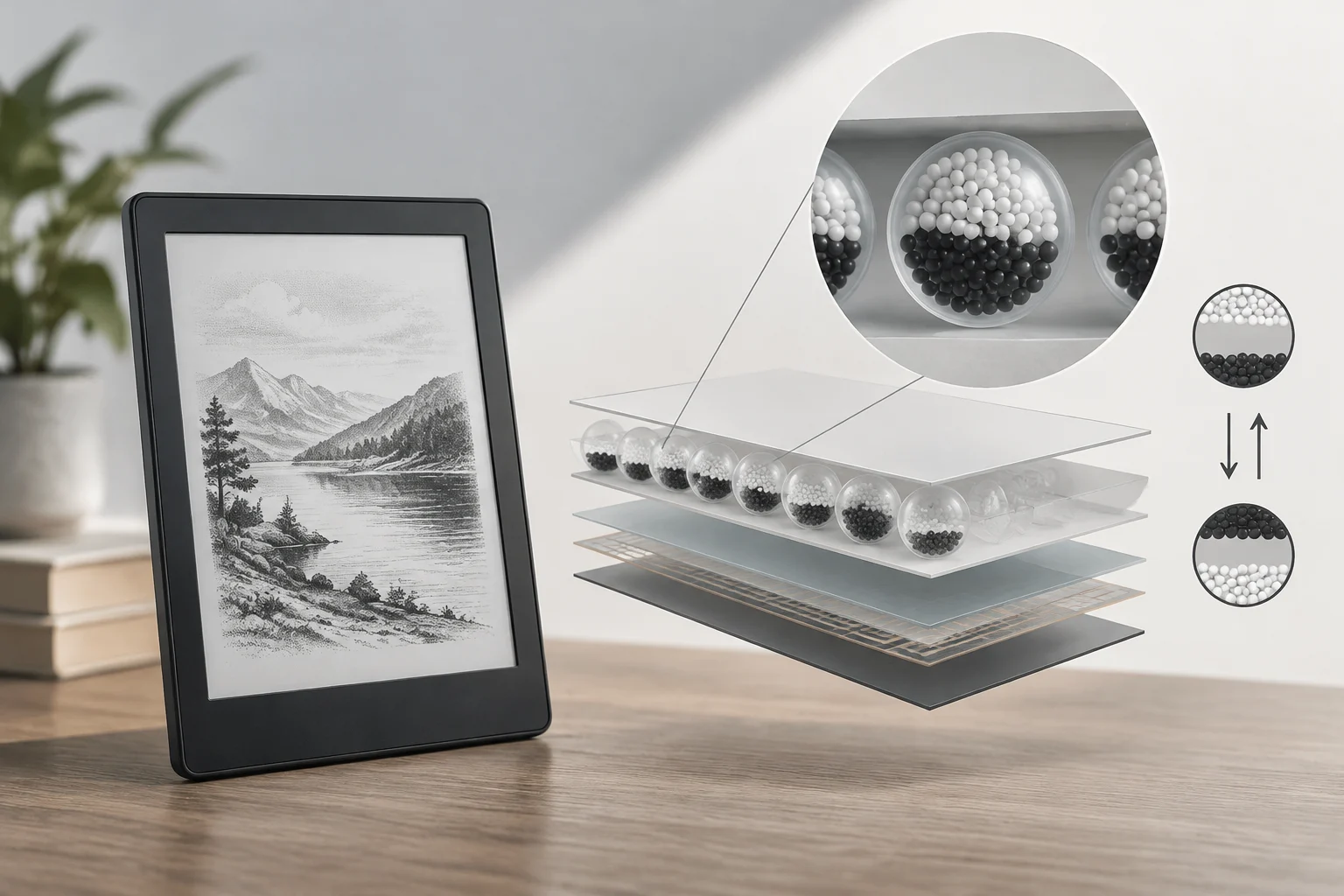
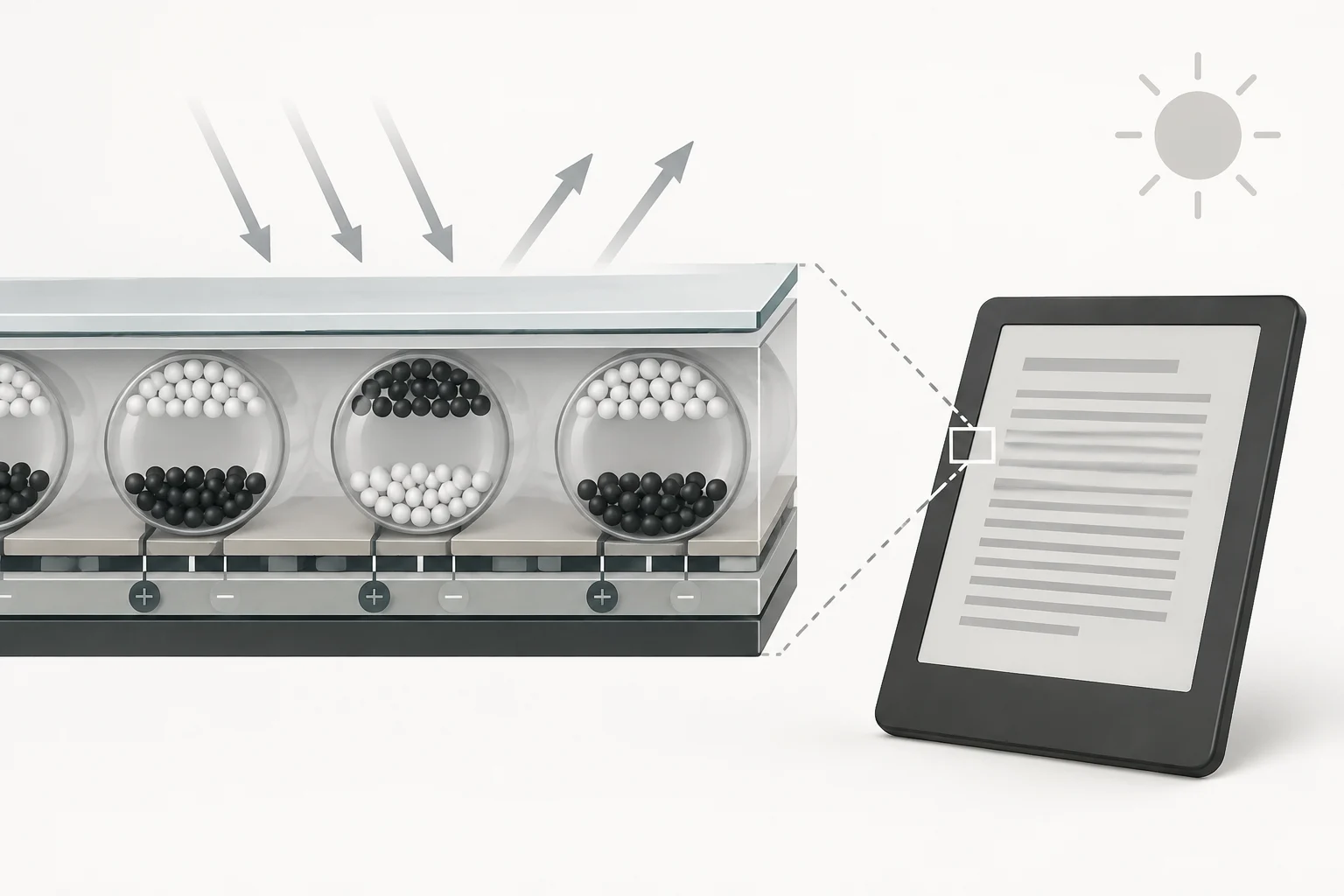
E-ink is a family of screen technologies that forms images using electrically controlled reflective elements. In a common technology, small capsules contain light and dark particles with electrical charges. When a signal is applied, the particles move within each element: some stay closer to the surface than others, changing the tone reflected toward the reader.
The screen does not need to produce light from behind for the text to be visible: it reflects ambient light, similar to paper. This helps explain why it is usually read with ambient light and why such a screen can be comfortable outdoors. It also explains that, in dark environments, an external lamp or integrated front lighting is needed. This front light illuminates the surface; it does not turn the screen into a backlit LCD.
Energy consumption has an important characteristic: the image can remain visible without the screen having to update it continuously. Energy is mainly used when changing content, although the reader also consumes battery for other tasks, such as processing files, using wireless connectivity, or powering front lighting. Thus, screen technology contributes to extended battery life, but it does not guarantee identical duration for all devices or usage habits.
Why refresh is different
Moving particles requires time. When turning pages, scrolling a document, or animating content, e-ink usually responds slower than a screen designed for video and fluid animations. Depending on the device and refresh mode, visible transitions or faint remnants of the previous image may appear before a full update. It is not a screen designed for continuous motion: its advantage lies in keeping static text with low consumption, not in competing with a tablet for video or games.
E-ink versus LCD and OLED
The useful comparison is not that one technology is always better than another, but what task each screen prioritizes. E-ink reflects ambient light; LCD and OLED screens generate light to display the image. In an LCD, backlighting illuminates the panel; in OLED, pixels emit light. In both cases, the screen usually updates continuously and facilitates color and motion, at the cost of different consumption and visual experience.
| Feature | E-ink | LCD or OLED |
|---|---|---|
| How it looks | Reflects ambient light | The screen generates light |
| Reading in sunlight | Usually maintains good legibility because it does not rely on bright backlighting | Reflections and ambient light can hinder reading depending on the panel and finish |
| Consumption when keeping a fixed page | Low: the image can remain without constant updating | The screen and lighting or emission system keep working |
| Refresh and motion | Slower; suitable for text and page changes | Smoother; suitable for video, animations, and continuous scrolling |
| Color and multimedia content | Depends on the panel; many readers focus on text and limited tones | Wide availability of color and better suitability for audiovisual content |
The table summarizes technology trends, not a proof of specific models. Brightness, surface, lighting mode, resolution, software, and reading conditions change the experience. E-ink does not eliminate all reflections nor guarantee that everyone prefers its contrast; a well-adjusted LCD or OLED can also serve for reading, especially occasionally.
The screen effect should not be confused with a medical promise. Reflectivity and the absence of a light source behind the panel describe how the image is generated; they do not allow concluding that a device cures or prevents visual problems. For decision-making, factors like font size, brightness, distance, session duration, and the need to read under direct light are more concrete.
EPUB, PDF, MOBI, and DRM: what determines compatibility
An e-reader does not necessarily support all formats. Compatibility depends on the model, operating system, installed applications, and sometimes the store where the book was obtained. EPUB is an open and widely used format: it organizes the content and resources of a digital publication, allowing text to adapt to different screen sizes and fonts, if the file and reader permit it.
PDF preserves page layout, which can be useful for forms, designed articles, or documents where the location of graphics and columns matters. This same feature can complicate reading on small screens: zooming in on a page may require horizontal and vertical scrolling, and text does not always redistribute. For prose, a reflowable format like EPUB usually allows better font size adjustment; for a two-column academic document, preserving layout may be more important than adapting text.
MOBI and other formats associated with specific ecosystems may appear in catalogs or personal libraries, but their support should not be assumed universal. Similar extensions do not guarantee that two files have the same capabilities or that a reader can open them. Before buying, it is advisable to check the format list of the exact model and distinguish between file compatibility and the ability to open it with a specific application or service.
What DRM means
DRM, or Digital Rights Management, is a set of controls that can restrict access, copying, or use of a file. In practice, a protected book may require an account, an authorized application, or a compatible device. A compatible format is not enough if the DRM is not: a reader opening unprotected EPUB does not imply it can open any EPUB bought in any store.
Rights management depends on the edition and conditions set by the distributor or publisher. January 2026 coverage reported that the Kindle Direct Publishing platform would allow authors and publishers to offer EPUB and PDF downloads for DRM-free titles; the described option does not automatically apply to all books nor eliminate digital lending restrictions. For a specific purchase, one must check the title's conditions and not extrapolate a policy to an entire store catalog.
Battery life, light, and comfort: advantages that depend on use
The energy advantage partly comes from e-ink not needing to maintain backlighting to keep a static page. Consequently, many readers can go long periods between charges in reading-centric use. There is no universal battery life figure: front lighting, Wi-Fi, Bluetooth, screen size, and change frequency can modify consumption, in addition to battery capacity and state.
By reflecting ambient light, an e-ink screen is usually legible outdoors and does not need to compete with the sun via high brightness. But it is not equivalent to reading paper in any condition: a dark room requires lighting, integrated front light consumes energy, and perceived contrast depends on the panel and environment. If the device will be used mainly at night, it is important to check how its lighting is controlled and if it can be adjusted to the desired level.
Dedicated design usually prioritizes reading and, in some models, includes annotation functions. At the same time, weight, size, buttons, touchscreen, and ergonomics vary between models. For a person carrying the device during commutes, portability can be as relevant as the screen; for those reading manuals with diagrams or consulting notes, size and PDF handling may weigh more than battery life.
Limits and practical choice between reader, tablet, and phone
E-ink is not optimized for video, fast animations, or fluid scrolling. Image update is slower than on LCD or OLED screens, and color may be limited or unavailable, depending on the panel. Front light is not universal either: some readers rely on an external lamp, while others integrate lighting. One must review the specific model, not assume all e-ink screens are the same.
For students and professionals, the material format can decide the purchase. A small reader can be comfortable for novels and reflowable EPUB, but less practical for scientific articles with columns, dense tables, or figures requiring frequent zoom. A tablet facilitates color, navigation, and quick annotation; it also allows using varied applications. A smartphone can also serve for reading digital books; the choice depends on screen size and the functions needed for your documents.
A practical rule is to choose based on the dominant task, not a general promise of superiority:
- E-reader: frequent text reading, long sessions, outdoor use, and preference for a reflective screen.
- Tablet: fixed-layout PDF, color, intensive annotations, navigation, video, and general-purpose applications.
- Phone: occasional reading, short fragments, and access to books when not carrying another device is a priority.
Before buying, verify the format of the books you already have, the DRM conditions of the stores you use, the necessary size for your documents, and if you require integrated light. For PDF, check if the reader allows zooming or redistributing text adequately. The safest choice is the one that matches your files and real habits: an efficient screen does not compensate for an incompatible format or a page too small to read comfortably.